UAN Activation and PF Transfer After Changing Jobs: Step-by-Step Guide
Every time you switch jobs in India, a small but important piece of paperwork tends to get forgotten in the excitement of a new role: your Provident Fund account. Getting your UAN properly activated and your PF transferred rather than left behind at your old employer is one of those unglamorous admin tasks that genuinely pays off years later, when you're not scrambling to consolidate scattered retirement savings across three or four old employers.

What Is UAN and Why Does It Matter?
UAN, or Universal Account Number, is a permanent number allotted by the EPFO that acts as an umbrella over every PF account you'll ever have across your career. Each time you join a new employer, you get a new Member ID for that specific job, but it stays linked under the same UAN, letting you view your entire consolidated PF history from one login rather than juggling separate accounts you'd otherwise lose track of. Since your UAN stays with you for life regardless of how many employers you work for, it's genuinely one of the more useful pieces of your employee provident fund transfer infrastructure, even though most people only think about it during the scramble of changing jobs. It's also worth keeping a personal note of your previous employer PF details — the Member ID, the establishment code, and your date of exit — somewhere safe each time you leave a job, since HR contacts and old payslips have a way of becoming hard to track down exactly when you need them for a transfer request.
How to Activate UAN Number Online: Step by Step
If your UAN hasn't been activated yet, here's exactly how to activate UAN number online step by step through the official EPFO member portal:
1. Go to the UAN member activation page on the EPFO member portal (unifiedportal-mem.epfindia.gov.in) and select "Activate UAN."
2. Enter your UAN, your registered mobile number, and your Member ID if you have it.
3. Click to request an OTP, which is sent to your registered mobile number.
4. Enter the OTP to verify your identity.
5. Set a password of 8 to 25 alphanumeric characters, including at least one special character.
6. Log in going forward using your UAN and this password for all future EPFO portal access.
When you join a new employer, you'll also need to declare your existing UAN to them through Form 11, the standard declaration form, so the new employer can link your new Member ID to the same UAN rather than accidentally creating a duplicate or orphaned account.
UAN Not Activated After Joining New Company: What to Do
If your UAN not activated after joining new company situation drags on, the first thing to check is whether you correctly declared your existing UAN via Form 11 when you joined — a surprising number of activation delays trace back to this step being skipped or filled incorrectly during onboarding. If that's been done correctly and there's still no movement, follow up directly with your new employer's HR or payroll team, since they need to complete their side of the linking process before your account becomes fully active under the new employment. There's no officially published fixed turnaround time for this step, so a reasonable approach is following up if it hasn't happened within a few weeks of your joining date. In the meantime, your PF contributions from the new employer are still technically being deposited and accounted for, even if the UAN linkage itself is still pending administratively — the delay is usually a paperwork bottleneck rather than a sign that your money isn't being credited at all.
PF Transfer After Job Change: The Process, Step by Step
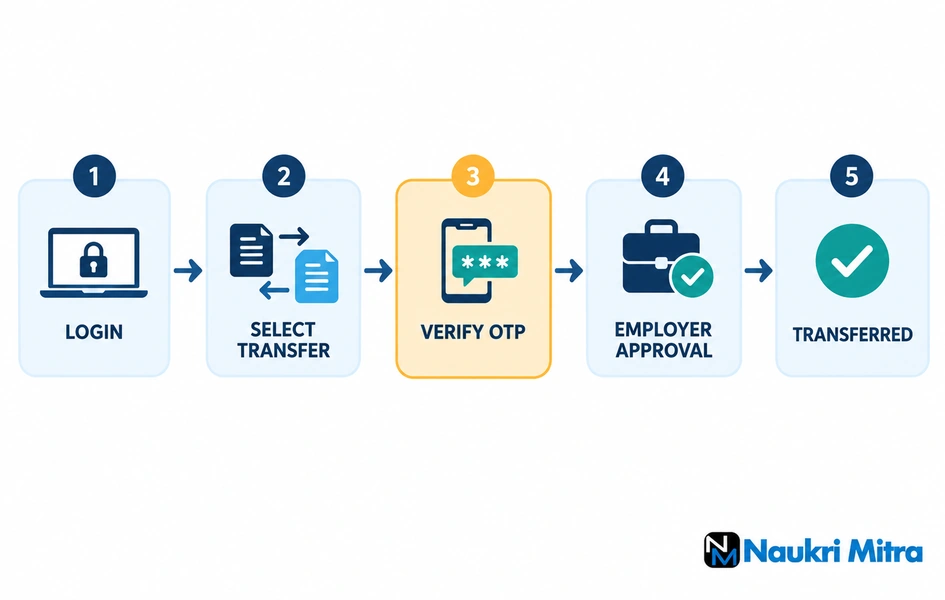
Once your UAN is active, the PF transfer after job change process follows a fairly structured sequence through the EPFO member portal's "One Member – One EPF Account" transfer request feature:
1. Log in to the unified member portal using your UAN, password, and the captcha.
2. Go to "Online Services" and select "One Member – One EPF Account (Transfer Request)."
3. Review your personal and employment details as displayed, then confirm they're accurate.
4. Choose whether your previous or current employer will attest the transfer claim.
5. Submit the request and verify it with an OTP sent to your registered mobile number.
6. Download the auto-generated Form 13 and sign it within the following 10 days.
7. Submit the signed form to the chosen employer for their digital approval.
8. You'll receive an SMS notification once the employer and EPFO process the approval.
The honest answer to PF transfer time taken after resignation questions is that there's no single officially guaranteed number of days — some sources cite figures of up to roughly 20 days once the request is submitted and attested, but this depends heavily on how quickly your employer attests the request and how EPFO's internal processing queue is moving at the time. A reasonable expectation is a few weeks from submission to completion, though it's worth actively tracking status rather than assuming it's automatically progressing in the background.
What Happens If I Don't Transfer PF From My Old Employer?
Your money doesn't disappear, but leaving it behind creates real inconvenience later. An inactive PF account from a previous employer continues to exist under your UAN, and it still earns interest for up to three years after it becomes inactive (with no contributions), after which it's classified as an "inoperative account" and stops earning interest, though the principal amount remains claimable. Managing multiple scattered accounts across different employers, rather than one consolidated balance, makes it considerably harder to track your actual retirement savings and can complicate withdrawal or transfer later, which is exactly why transferring promptly after each job change is worth the modest effort. It also makes retirement planning genuinely harder to do accurately — if your actual PF corpus is spread across three inactive accounts you've mentally written off, your real retirement savings picture looks worse on paper than it actually is, simply because you're not counting money that's rightfully yours.
How to Merge Two PF Accounts Online
If you already have two separate PF accounts under the same UAN — common when a transfer request wasn't filed at the time of an earlier job change — the process for how to merge two PF accounts online is essentially the same "One Member – One EPF Account" transfer request described above, just filed after the fact rather than immediately at the time of switching jobs. It's genuinely possible to do this years later; there's no strict deadline that permanently blocks a delayed merge, though doing it sooner rather than later avoids the account drifting into inoperative status in the meantime. If you've lost track of an old Member ID entirely, your UAN login itself usually shows a consolidated view of all linked accounts under your passbook section, which is often the fastest way to rediscover a forgotten balance from an employer you left years ago.
Is PF Transfer Mandatory, or Can I Withdraw Instead?
Transfer isn't strictly mandatory — you can choose to withdraw your PF balance instead of transferring it when you leave a job, but this comes with an important tax catch. Weighing PF withdrawal vs transfer honestly, transfer is almost always the financially smarter choice unless you have a genuine, immediate need for the money, since it preserves both your continuous service record and the compounding growth of your retirement corpus. If you withdraw before completing 5 years of continuous service (with transfers between employers counting toward this continuity, provided you transferred rather than withdrew at each step), TDS is deducted at 10% on amounts above Rs 50,000 if you've provided your PAN, or 20% if you haven't. Withdrawing early also means losing the compounding benefit of keeping the corpus invested, which is why most financial advisors recommend transferring rather than withdrawing unless you have a genuine, immediate need for the funds.
How to Raise a Grievance for a Delayed PF Transfer
If your transfer request has been pending well beyond a reasonable timeframe, EPFO's official grievance portal, EPFiGMS, is the right channel. Log in, select "Register Grievance," verify your identity via UAN and OTP, and the system automatically routes your complaint to the relevant EPFO office based on your jurisdiction. Fill in the specific details of your delayed transfer, attach any supporting documents if relevant, and submit — you'll receive an acknowledgement with a unique registration number by SMS and email, and you can track the grievance status or send a reminder directly through the same portal if it remains unresolved. This route tends to get genuine attention faster than repeatedly calling the regional EPFO office, simply because a registered grievance creates a trackable record that someone is formally accountable for resolving within a reasonable timeframe.
Frequently Asked Questions
1. What documents are required for UAN KYC update?
Typically your Aadhaar, PAN, and bank account details with IFSC code need to be linked and verified against your UAN profile — this KYC completion is also often a prerequisite for a smooth online PF transfer or withdrawal request.
2. Can I have multiple PF accounts under one UAN?
Yes, this happens naturally if you don't transfer your balance at every job change — each employer generates a separate Member ID, but they can all be linked and eventually merged under your single UAN using the online transfer request process.
3. What if my old company's PF account isn't linked to my UAN at all?
This can happen with older accounts predating UAN adoption or due to KYC mismatches. Raising a grievance through EPFiGMS with your old Member ID and employment details is the standard way to get this corrected and properly linked.
4. Does PF transfer affect my gratuity calculation?
No, these are entirely separate benefits governed by different rules — PF transfer relates only to your provident fund balance and continuity, while gratuity eligibility is calculated independently based on your actual years of continuous service with each specific employer.
5. Can I check my PF transfer status online without calling anyone?
Yes, the EPFO member portal shows your claim status under the "Track Claim Status" section once you're logged in, giving you a real-time update without needing to call the regional office directly.
6. Does interest keep accruing on an inactive PF account?
Yes, for up to three years after the account becomes inactive with no further contributions. After that period, it's classified as inoperative and stops earning interest, though you can still claim the principal amount that had accumulated.
7. Can I merge PF accounts years after actually changing jobs?
Yes, there's no strict deadline preventing a delayed transfer request, though doing it sooner avoids the risk of an account drifting into inoperative, interest-free status in the meantime.
Starting a new job soon and want to compare openings before you commit? Browse current listings on naukrimitra.in.


Comments
Post a Comment